Sony’s new PlayStation PC overlay is a simple start | The Markets Cafe
  • Privacy Policy
  • Terms of use
  • Press Release
  • Advertise
  • Contact
Tuesday, December 30, 2025
No Result
View All Result
Subscribe
  • Login
The Markets Cafe
  • News
  • Politics
  • Markets
    • Stocks
    • Futures
    • Commodities
  • Crypto
    • News
    • Markets
    • NFT
    • DeFi
    • Explained
  • Economy
  • Finance
  • Investing
  • Forex
  • Real Estate
  • Tech
  • VideosHOT
  • Community
  • Charts
  • News
  • Politics
  • Markets
    • Stocks
    • Futures
    • Commodities
  • Crypto
    • News
    • Markets
    • NFT
    • DeFi
    • Explained
  • Economy
  • Finance
  • Investing
  • Forex
  • Real Estate
  • Tech
  • VideosHOT
  • Community
  • Charts
No Result
View All Result
The Markets Cafe
No Result
View All Result
  • News
  • Politics
  • Markets
  • Crypto
  • Economy
  • Finance
  • Forex
  • Investing
  • Tech
  • Videos
  • Community
Home Tech

Sony’s new PlayStation PC overlay is a simple start

by Press Room
May 16, 2024
in Tech
101 2
A A
0
21
SHARES
687
VIEWS
FacebookTwitter

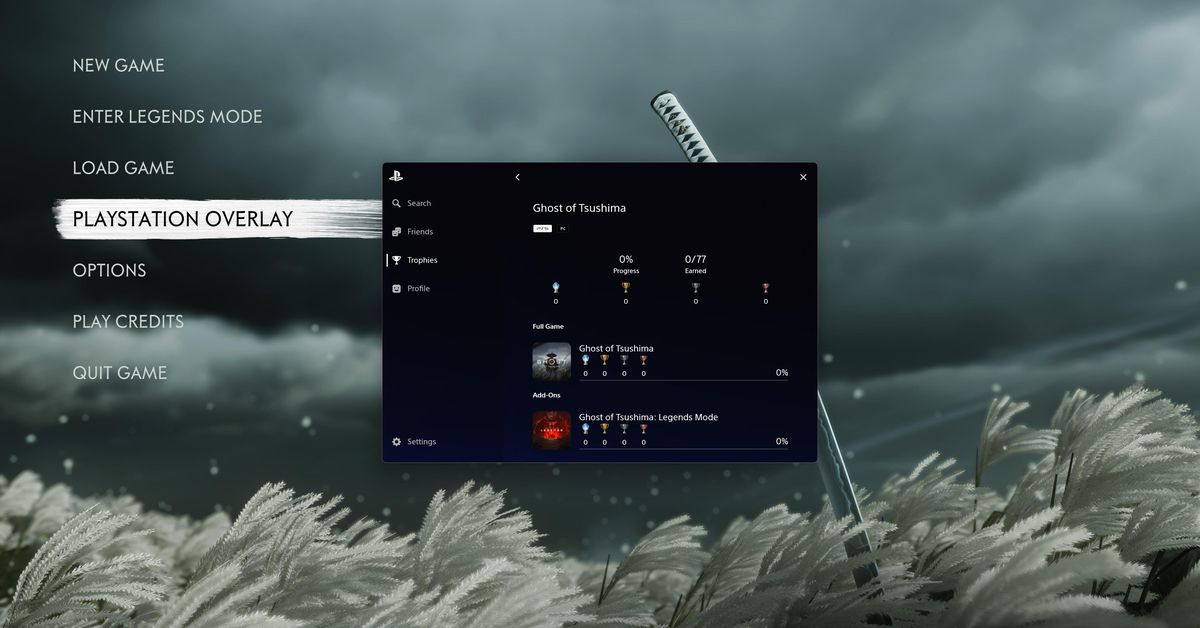
Ghost of Tsushima Director’s Cut debuts on PC today, and it’s the first game to feature Sony’s new PlayStation PC overlay and shared Trophies system. I’ve had a chance to get a first look at this new overlay, and my initial impression is that it’s really unobtrusive, clean, and simple.

There are five main sections here: search, friends, Trophies, profile, and settings. Search lets you find other PlayStation players and add them as friends, whereas the friends section lists both your online and offline friends. You can see your friends’ Trophies, but you can’t message friends or party chat from this overlay, unfortunately. You’ll have to use in-game chat if you want to speak to a console friend, or just use Discord.

The PlayStation PC overlay in action.
GIF by Tom Warren / The Verge

The Trophies system works just as you’d expect, by syncing Ghost of Tsushima Director’s Cut trophies from the PS5 version of the game to PC, and vice versa. You just sign in to your PlayStation Network ID, and the overlay and Trophies are both available.

The profile section lets you view all your existing Trophies across all your PlayStation games, and the settings section is largely web links to account management, privacy settings, and PlayStation support. There are settings to enable or disable notifications for Trophies, and the ability to see who you’ve blocked on PSN.

Overall, the PlayStation PC overlay works much like Steam’s, in the sense that it’s only active within a game. Sony hasn’t created something that’s constantly running in the background like Nvidia’s GeForce Experience or Microsoft’s Xbox Game Bar.

A trio of notifications will greet you if you haven’t disabled GeForce Experience and the Steam overlay pop-ups.
Screenshot by Tom Warren / The Verge

I did notice that if you haven’t disabled notifications for the GeForce Experience and Steam overlays, then you’ll get a trio of pop-up notices when you start Ghost of Tsushima Director’s Cut because the PlayStation one also has its own notification. Unfortunately, there’s no way to disable the PlayStation notification, as the pop-up notifications toggle doesn’t affect this particular message.

Still, the overlay looks and feels lightweight, even if it’s a little basic right now. Nixxes Software, the in-house port developer that Sony acquired in 2021, helped create it, and I’m hoping this simple start will lead to even more features in the future. It sure would be great to have the option of using the voice chat features of the PlayStation Network instead of having to use in-game chat or Discord. Sony is increasingly investing in the PC space, so there’s a good chance this PlayStation overlay improves over time.

Read the full article here

Related Articles

Tech

This smart garden turned my black thumb green

December 30, 2025
Tech

The Canon EOS R6 Mark III is great, but this lens is amazing

December 30, 2025
Tech

LG officially enters the art TV category with the Gallery TV

December 30, 2025
Tech

How to tweak your online platform algorithms

December 29, 2025
Tech

Windows on Arm had another good year

December 29, 2025
Tech

This experimental camera can focus on everything at once

December 29, 2025

About Us

The Markets Cafe

The Markets Cafe is your one stope Finance, Politics and bussines news website, follow us to get the latest news and updates from around the world.

Sections

  • Commodities
  • Crypto Markets
  • Crypto News
  • DeFi
  • Economy
  • Explained
  • Finance
  • Forex
  • Futures
  • Investing
  • Markets
  • News
  • NFT
  • Politics
  • Real Estate
  • Stocks
  • Tech
  • Videos

Site Links

  • Contact
  • Advertise
  • DMCA
  • Submit Article
  • Forum
  • Site info
  • Newsletter

Newsletter

THE MOST IMPORTANT FINANCE NEWS AND EVENTS OF THE DAY

Subscribe to our mailing list to receives daily updates direct to your inbox!

  • Privacy Policy
  • Terms of use
  • Press Release
  • Advertise
  • Contact

© 2022 The Markets Café - All rights reserved.

No Result
View All Result
  • News
  • Politics
  • Markets
    • Stocks
    • Futures
    • Commodities
  • Crypto
    • News
    • Markets
    • NFT
    • DeFi
    • Explained
  • Economy
  • Finance
  • Investing
  • Forex
  • Real Estate
  • Tech
  • Videos
  • Community
  • Charts

© 2022 The Markets Café - All rights reserved.

Welcome Back!

Login to your account below

Forgotten Password?

Retrieve your password

Please enter your username or email address to reset your password.

Log In
This website uses cookies. By continuing to use this website you are giving consent to cookies being used. Visit our Privacy and Cookie Policy.