Windows 11 is getting a force quit option to close apps without the Task Manager | The Markets Cafe
  • Privacy Policy
  • Terms of use
  • Press Release
  • Advertise
  • Contact
Tuesday, January 20, 2026
No Result
View All Result
Subscribe
  • Login
The Markets Cafe
  • News
  • Politics
  • Markets
    • Stocks
    • Futures
    • Commodities
  • Crypto
    • News
    • Markets
    • NFT
    • DeFi
    • Explained
  • Economy
  • Finance
  • Investing
  • Forex
  • Real Estate
  • Tech
  • VideosHOT
  • Community
  • Charts
  • News
  • Politics
  • Markets
    • Stocks
    • Futures
    • Commodities
  • Crypto
    • News
    • Markets
    • NFT
    • DeFi
    • Explained
  • Economy
  • Finance
  • Investing
  • Forex
  • Real Estate
  • Tech
  • VideosHOT
  • Community
  • Charts
No Result
View All Result
The Markets Cafe
No Result
View All Result
  • News
  • Politics
  • Markets
  • Crypto
  • Economy
  • Finance
  • Forex
  • Investing
  • Tech
  • Videos
  • Community
Home Tech

Windows 11 is getting a force quit option to close apps without the Task Manager

by Press Room
May 24, 2023
in Tech
97 6
A A
0
21
SHARES
687
VIEWS
FacebookTwitter

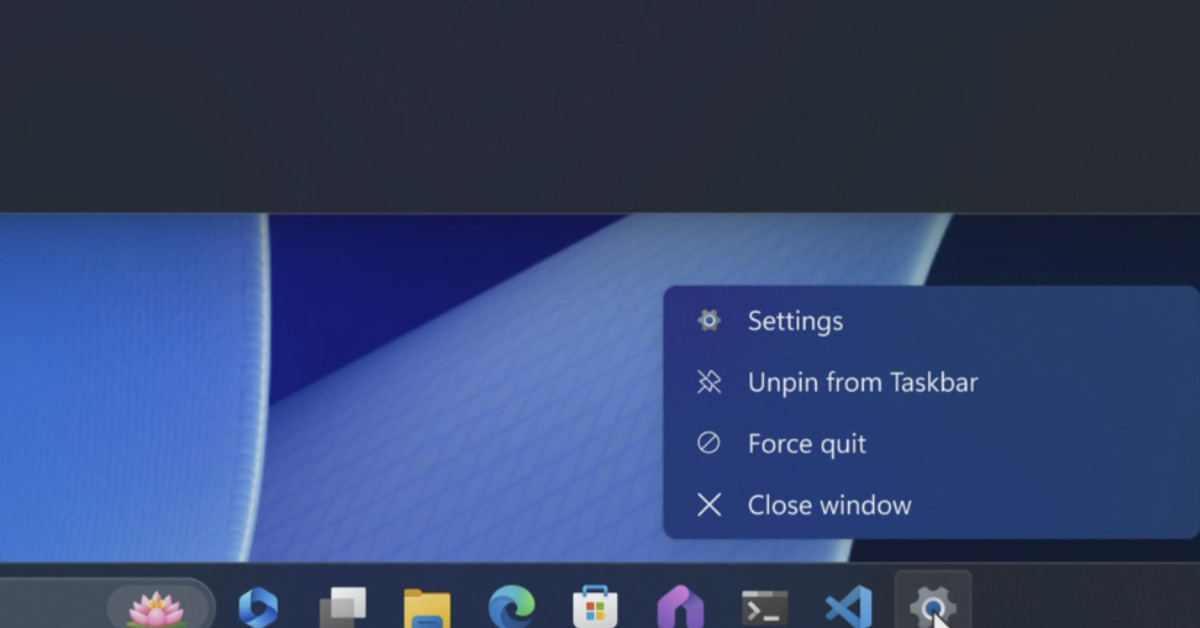
Microsoft is planning to add a force quit option to the Windows 11 taskbar. Similar to macOS, it will allow Windows users to finally force crashed apps and buggy ones directly from the taskbar without having to open Task Manager.

Native RAR and 7-zip support in Windows 11.
Image: Microsoft

Microsoft has also released a new Windows 11 test build today that includes another taskbar improvement that people have been waiting for. Never combine mode lets you see each app window on the taskbar individually with labels. It was missing at the launch of Windows 11, like many other taskbar features that have appeared with subsequent updates.

This new build also includes backup and restore features for PCs, making it much easier to restore apps, settings, and even passwords and credentials for Wi-Fi networks on a new PC. Microsoft is also tweaking and improving some of its emoji for Windows 11 to make them more recognizable.

All of these new features should arrive in the coming months for all Windows 11 users.

Read the full article here

Related Articles

Tech

A second US Sphere could come to Maryland

January 19, 2026
Tech

This 5-foot lamp is a supersized tribute to the world’s most iconic pen

January 19, 2026
Tech

Gamers will learn to love AI, says Razer CEO

January 19, 2026
Tech

Asus may have made its last phone

January 19, 2026
Tech

Threads overtakes X on mobile, but still lags far behind

January 19, 2026
Tech

Microsoft’s first Windows 11 update of 2026 stopped some computers from shutting down

January 18, 2026

About Us

The Markets Cafe

The Markets Cafe is your one stope Finance, Politics and bussines news website, follow us to get the latest news and updates from around the world.

Sections

  • Commodities
  • Crypto Markets
  • Crypto News
  • DeFi
  • Economy
  • Explained
  • Finance
  • Forex
  • Futures
  • Investing
  • Markets
  • News
  • NFT
  • Politics
  • Real Estate
  • Stocks
  • Tech
  • Videos

Site Links

  • Contact
  • Advertise
  • DMCA
  • Submit Article
  • Forum
  • Site info
  • Newsletter

Newsletter

THE MOST IMPORTANT FINANCE NEWS AND EVENTS OF THE DAY

Subscribe to our mailing list to receives daily updates direct to your inbox!

  • Privacy Policy
  • Terms of use
  • Press Release
  • Advertise
  • Contact

© 2022 The Markets Café - All rights reserved.

No Result
View All Result
  • News
  • Politics
  • Markets
    • Stocks
    • Futures
    • Commodities
  • Crypto
    • News
    • Markets
    • NFT
    • DeFi
    • Explained
  • Economy
  • Finance
  • Investing
  • Forex
  • Real Estate
  • Tech
  • Videos
  • Community
  • Charts

© 2022 The Markets Café - All rights reserved.

Welcome Back!

Login to your account below

Forgotten Password?

Retrieve your password

Please enter your username or email address to reset your password.

Log In
This website uses cookies. By continuing to use this website you are giving consent to cookies being used. Visit our Privacy and Cookie Policy.