Microsoft’s new Windows 11 Start menu is bigger and fixes a major pain point | The Markets Cafe
  • Privacy Policy
  • Terms of use
  • Press Release
  • Advertise
  • Contact
Thursday, July 2, 2026
No Result
View All Result
Subscribe
  • Login
The Markets Cafe
  • News
  • Politics
  • Markets
    • Stocks
    • Futures
    • Commodities
  • Crypto
    • News
    • Markets
    • NFT
    • DeFi
    • Explained
  • Economy
  • Finance
  • Investing
  • Forex
  • Real Estate
  • Tech
  • VideosHOT
  • Community
  • Charts
  • News
  • Politics
  • Markets
    • Stocks
    • Futures
    • Commodities
  • Crypto
    • News
    • Markets
    • NFT
    • DeFi
    • Explained
  • Economy
  • Finance
  • Investing
  • Forex
  • Real Estate
  • Tech
  • VideosHOT
  • Community
  • Charts
No Result
View All Result
The Markets Cafe
No Result
View All Result
  • News
  • Politics
  • Markets
  • Crypto
  • Economy
  • Finance
  • Forex
  • Investing
  • Tech
  • Videos
  • Community
Home Tech

Microsoft’s new Windows 11 Start menu is bigger and fixes a major pain point

by Press Room
April 8, 2025
in Tech
97 6
A A
0
21
SHARES
687
VIEWS
FacebookTwitter

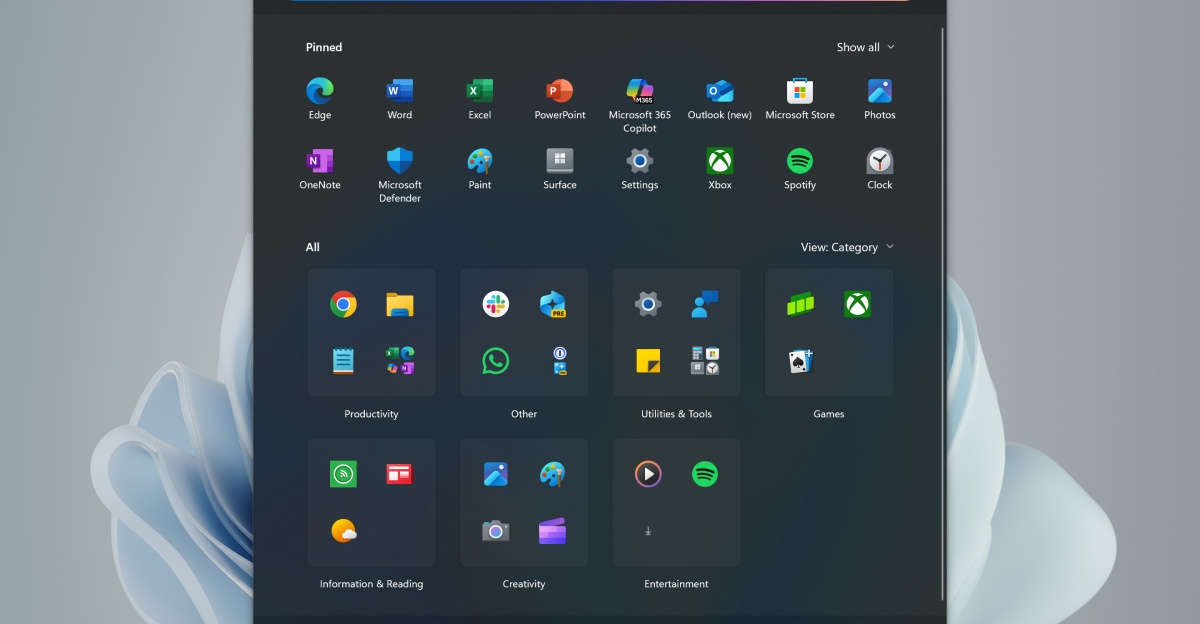
Microsoft is working on a new Windows 11 Start menu design that’s bigger and more customizable than what exists today. Windows watcher phantomofearth discovered the new design in recent builds of Windows 11, where the updated Start menu has a larger layout and finally lets you disable the recommended feed of files and apps.

The recommended feed had been a major pain point for Windows 11 users who upgraded from Windows 10, because it takes up a lot of space on the Start menu, and not everyone needs to see their recent files and apps. Microsoft’s new Start menu design now keeps everything on one scrollable page, and you can even access all apps without having to navigate to a separate section.

The all apps view is also easily accessible and can be set to a category view or list, depending on what you prefer the UI to look like. This larger Start menu also means that you can now pin more apps, up to 8 per row, and there’s no longer a limit of just three rows.

Microsoft has started testing this new Start menu design in 24H2 builds of Windows 11, but the software maker has also backported this to 23H2 versions. This suggests that this new design will make its way to all Windows 11 users in the coming weeks or months.

Read the full article here

Related Articles

Tech

Apple’s entry-level MacBook Pro could be up for a redesign

July 1, 2026
Tech

Elon Musk denies a report about SpaceX’s AI phone prototype

July 1, 2026
Tech

Xbox testing disc-to-digital feature that digitizes a physical game collection

July 1, 2026
Tech

My favorite Kindle alternative is $30 off after a recent price increase

July 1, 2026
Tech

The cube was a lie: up close with our Dbrand Companion Cube before it gets destroyed

July 1, 2026
Tech

Sony is killing all physical PlayStation game discs

July 1, 2026

About Us

The Markets Cafe

The Markets Cafe is your one stope Finance, Politics and bussines news website, follow us to get the latest news and updates from around the world.

Sections

  • Commodities
  • Crypto Markets
  • Crypto News
  • DeFi
  • Economy
  • Explained
  • Finance
  • Forex
  • Futures
  • Investing
  • Markets
  • News
  • NFT
  • Politics
  • Real Estate
  • Stocks
  • Tech
  • Videos

Site Links

  • Contact
  • Advertise
  • DMCA
  • Submit Article
  • Forum
  • Site info
  • Newsletter

Newsletter

THE MOST IMPORTANT FINANCE NEWS AND EVENTS OF THE DAY

Subscribe to our mailing list to receives daily updates direct to your inbox!

  • Privacy Policy
  • Terms of use
  • Press Release
  • Advertise
  • Contact

© 2022 The Markets Café - All rights reserved.

No Result
View All Result
  • News
  • Politics
  • Markets
    • Stocks
    • Futures
    • Commodities
  • Crypto
    • News
    • Markets
    • NFT
    • DeFi
    • Explained
  • Economy
  • Finance
  • Investing
  • Forex
  • Real Estate
  • Tech
  • Videos
  • Community
  • Charts

© 2022 The Markets Café - All rights reserved.

Welcome Back!

Login to your account below

Forgotten Password?

Retrieve your password

Please enter your username or email address to reset your password.

Log In
This website uses cookies. By continuing to use this website you are giving consent to cookies being used. Visit our Privacy and Cookie Policy.